
Source nuevaprensa.es
For gamers and content creators, the graphic processing unit (GPU) is an essential component of their system. The GPU takes on complex video rendering and displays tasks, which puts the component under a lot of stress. One of the concerns that arise with the use of a GPU is its temperature. A high temperature can cause damage to the component, which will affect the performance of the system. Therefore, it is crucial to understand the normal GPU temperature while idle.
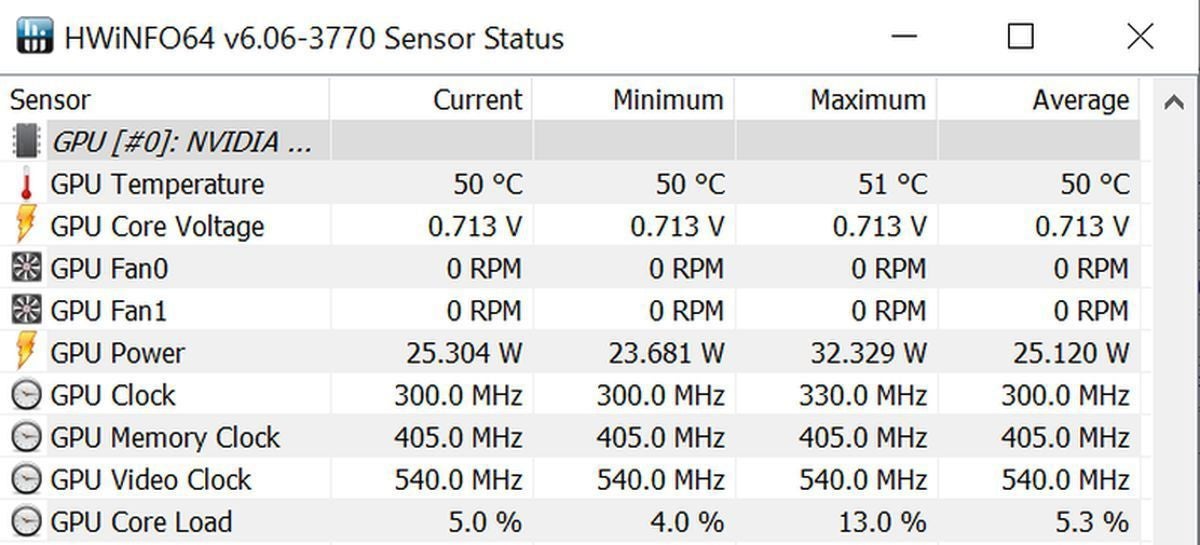
Idle temperature refers to the temperature of the GPU when there is little to no load on the component. When you're not doing anything graphic-intensive, like browsing the internet or typing a document, the temperature will be considered idle. The normal idle temperature of a GPU is around 30 to 40 degrees Celsius (°C). However, the temperature can vary depending on the brand and model of the GPU you are using.
It is essential to know the normal idle temperature of your GPU. This knowledge will help you monitor your component's temperature and take steps to keep it from getting too hot. When the system is idle, the GPU fan will run at a low speed, and the temperature will naturally stay within the normal range. This helps to conserve energy, reduce noise and prolong the life of the component.
Overall, knowing the normal idle temperature of your GPU is vital in maintaining the performance and health of your system. Keeping your GPU temperature under control will ensure that you get the best possible gaming and rendering experience while also prolonging the longevity of your system.
What is GPU Temperature and Why Does it Matter?
GPU temperature is the measurement of how hot your graphics processing unit (GPU) is running. The GPU is an essential component of a computer that helps to process and display graphics. The GPU temperature is recorded in degrees Celsius or Fahrenheit, depending on your preference, and is monitored using software, like HWMonitor, GPU-Z, or CAM.
GPU temperature matters because overheating can cause permanent damage to your computer. A GPU generates a lot of heat, but it is equipped with a cooling system to promote heat dissipation and maintain temperatures within a safe operating range. If your GPU is running too hot, it can cause your computer to crash, freeze, or even shut down. High GPU temperatures can also cause artifacting, which is when the graphics display becomes distorted, or screen tearing, which is when the display appears to be split vertically or horizontally. These can both be frustrating and make your computer unusable until the problem is resolved.
The Normal GPU Temperature while Idle
When your computer is not running any graphics-intensive applications, your GPU is considered idle. The normal GPU temperature while idle will vary depending on your GPU model, cooling system design, and ambient temperature. Manufacturers typically design graphics cards with a specific safe operating temperature range, but the recommended temperatures will differ for each model. For example, the NVIDIA GeForce GTX 970 can operate safely up to 98 degrees Celsius while the NVIDIA GeForce GTX 1060 can operate safely up to 94 degrees Celsius.
However, as a general rule of thumb, most GPUs should have a temperature between 30 to 50 degrees Celsius when idle. Anything outside of this range may indicate a problem with your cooling system or GPU. If you notice that your GPU temperature is consistently running higher than 50 degrees Celsius, it may be time to clean your computer's cooling system, replace your thermal paste, or even upgrade your cooling system.
Here is a table that shows the normal GPU temperature while idle for some popular GPU models:
| GPU Model | Normal GPU Temperature While Idle (Celsius) |
|---|---|
| NVIDIA GeForce GTX 970 | 30-40 |
| NVIDIA GeForce GTX 1060 | 30-40 |
| AMD Radeon RX 580 | 30-45 |
| NVIDIA GeForce RTX 2070 | 30-50 |
| AMD Radeon RX 5700 XT | 30-50 |
It is important to note that these temperatures are merely guidelines and should not be considered as the industry standard. It is always best to check your manufacturer's website for specific safe operating temperatures for your GPU model. If you are unsure and are experiencing issues with your GPU temperature, it may be best to seek professional help or consult your manufacturer's support team.
In conclusion, monitoring your GPU temperature is essential to ensure that your computer is running safely and efficiently. To avoid any permanent damage to your system, ensure that your GPU's temperature is within the safe operating range and consider cleaning your computer's cooling system regularly to maintain optimum performance.
For more information about GPU, temperature please check out this Wikipedia article.
The Ideal Temperature Range for GPUs at Idle
When it comes to the temperature of your Graphics Processing Unit (GPU), it is crucial to keep an eye on it to prevent any damage to the hardware or performance issues. GPU temperature is an indication of how efficiently the card is running. Typically, a GPU at idle should maintain a specific temperature range. Here we will talk about the ideal temperature range for GPUs at idle.
What is a GPU Temperature?
GPU temperature is the measurement of how much heat the GPU is producing while it's running. A GPU's temperature is an important factor in keeping the card in good condition. GPUs generate heat while operating, so it is important to maintain the temperature at acceptable levels to prevent harm to the card. When a GPU is at idle, it is not in use, and it shouldn't be generating much heat.
The Ideal Temperature Range for GPUs at Idle
The ideal temperature range for GPUs at idle is between 30-40°C (86-104°F). When a GPU is running in idle mode, this code lets the card rest and decreases its power consumption. A lower temperature range helps the GPU equipment last longer and prevent wear and tear on the card's components. Modern GPU chips also have a feature called fan stops, which will turn off the cooling system entirely when the GPU is below a specified temperature.
Here is a list of the ideal temperature range for GPUs at idle:
| Temperature Range | Description |
|---|---|
| Below 30°C (86°F) | Very cool and impressive. It indicates an idle GPU or an exceptionally efficient cooling system. |
| 30-40°C (86-104°F) | The ideal temperature range for GPUs at idle for most gaming graphics cards. GPUs within this range are secure from overheating and do not demand additional cooling. |
| Above 40°C (104°F) | Although still within the safe zone, this temperature range could lead to higher operating temperatures and slower processing speeds. It could be a sign of an issue with the cooling system. |
| Above 50°C (122°F) | At this range, it's time to check on the cooling system, especially if you notice any performance drops. It would be best if you cleaned the computer's dust to enhance airflow. |
Please keep in mind that the temperatures may vary based on the graphics card's manufacturer, clock speed, and other individual factors.
Conclusion
Monitoring your GPU temperature while it is idle is essential. Overheating can cause permanent damage to your graphics card, reducing its lifespan and harming its performance. By maintaining an ideal temperature range, your GPU will function correctly for an extended period. An efficient cooling system and proper ventilation will help your GPU remain at its optimal temperature. If you observe any unusual temperature ranges, it is wise to inspect the cooling system, clean the components, and replace any fans if necessary.
For more information about GPUs, visit Wikipedia.
Normal GPU Temperature While Idle
When it comes to graphics processing units (GPUs), temperature plays a vital role in overall performance and longevity. GPU temperature while idle refers to the temperature of the GPU while it is not processing any tasks. A typical idle temperature for a GPU should range between 30 to 40 degrees Celsius (°C). However, several factors affect idle GPU temperature, which we will discuss below.
Factors Affecting Idle GPU Temperature
1. Ambient Temperature
The ambient temperature is the surrounding temperature of the GPU. It plays a vital role in the idle GPU temperature, as it is responsible for dissipating the heat generated by the GPU. The hotter the surrounding temperature, the harder it is for the GPU to regulate its temperature. If we compare the idle temperature of a GPU in an air-conditioned room to that of a GPU in a non-air-conditioned room, the former will have a lower idle temperature than the latter.
2. Graphics Card Model and Architecture
The model and architecture of the GPU also affect its idle temperature. The higher the model of the GPU, the more powerful it is, and the more heat it produces. For instance, two GPUs from different models could have similar cooling systems, but the GPU with higher processing power will generate more heat. On the other hand, the architecture of the GPU plays a role in idle temperature. Newer architectures tend to be more power-efficient, leading to a reduction in idle GPU temperature.
3. Cooling Systems
The cooling systems of the GPU have a significant impact on idle temperature. The cooling system's job is to dissipate the heat generated by the GPU. There are different types of cooling systems utilized by GPUs, such as air cooling, liquid cooling, and hybrid cooling.
- Air cooling - It is the most common type of cooling used by GPUs. It leverages a system of fans and metal fins to dissipate heat from the GPU. The efficacy of air cooling relies heavily on the ambient temperature.
- Liquid cooling - It uses liquid or some form of coolant to cool the GPU. It is more effective than air cooling, but it is more expensive and requires a more complex installation process.
- Hybrid cooling - It utilizes both air and liquid cooling to provide better temperature regulation. It is the most effective type of cooling system used by GPUs.
The quality of the cooling system will determine how well the GPU will regulate its temperature even while idle. If a GPU has a low-quality cooling system, it would have a higher idle temperature than a GPU with a high-quality cooling system.
4. Overclocking
Overclocking refers to running a GPU at a higher clock speed than the factory preset speed. It increases the processing power of the GPU but also generates more heat, putting more pressure on the cooling system. Overclocking a GPU can increase its idle temperature. Therefore, it is essential to keep an eye on the temperature when overclocking to prevent any damage to the GPU.
5. Dust and Debris on Cooling System
Dust and debris accumulation on the cooling system can inhibit its effectiveness in dissipating heat from the GPU. It leads to an increase in idle temperature. Regular cleaning of the cooling system is necessary to keep the dust and debris at bay and maintain optimal temperature regulation.
In a nutshell, idle GPU temperature is crucial for the overall health and performance of the GPU. We cannot control some factors affecting idle GPU temperature, such as ambient temperature and GPU architecture, but we can control others, such as cooling systems and dust accumulation. Maintaining a moderate idle temperature ensures the long-term efficiency and longevity of your GPU.
External Link: Graphics Processing Unit - Wikipedia
Normal GPU Temperature While Idle
One of the essential pieces of hardware in a computer is a graphics processing unit (GPU). It is responsible for rendering images and video on a computer screen. However, like any other hardware, GPU generates heat during operation and may get damaged if not kept within safe limits. It is essential to know what the normal GPU temperature while idle is and how to check the temperature of your GPU.
What is the Normal GPU Temperature while Idle?
The normal GPU temperature while idle varies depending on the type of GPU, cooling efficiency, and other factors. Typically, an idle temperature of 30-50 degrees Celsius (86-122 degrees Fahrenheit) is considered safe for most GPUs. However, in some cases, the temperature may go as low as 20 degrees Celsius (68 degrees Fahrenheit) or as high as 60 degrees Celsius (140 degrees Fahrenheit) while idle without any issues. Anything beyond these limits may indicate an underlying problem, and you must take necessary measures to lower the temperature.
How to Check the Temperature of Your GPU
Checking the temperature of your GPU is essential to keep it within safe temperature limits and optimize your computer's performance. Here are some ways to check the GPU temperature:
1. Use Built-in System Tools
Most modern computer systems come with built-in system tools that can monitor the temperature of your GPU. For example, Windows 10 has a Task Manager that displays the GPU temperature along with other performance metrics. Additionally, you can use third-party applications like GPU-Z and MSI Afterburner, which provide detailed information on GPU temperature, clock speed, and fan speed.
2. Check BIOS Settings
The Basic Input/Output System (BIOS) of your computer may provide information about the temperature of your GPU. Reboot your computer and access the BIOS settings by pressing a key combination during startup. Look for hardware monitoring options that display GPU temperature and other metrics.
3. Use Hardware Monitoring Software
You can also use hardware monitoring software like SpeedFan and Open Hardware Monitor to check the GPU temperature. These software applications provide real-time temperature readings for various hardware components, including the GPU and CPU.
| GPU Model | Normal Idle Temperature | Safe Temperature Range |
|---|---|---|
| Nvidia GTX 1060 | 35°C | 30-60°C |
| AMD Radeon RX 580 | 45°C | 35-70°C |
| Nvidia RTX 2080 Ti | 36°C | 30-70°C |
4. Monitor GPU Temperature using Desktop Widgets
You can place desktop widgets on the computer's desktop that continuously monitors GPU temperature. These widgets provide users with a real-time temperature display, which can alert users if the temperature goes beyond safe limits. Examples of these widgets include Rainmeter and HWiNFO.
Final Thoughts
It is crucial to keep an eye on the GPU temperature while idle to maintain its longevity and optimal performance. The normal GPU temperature while idle varies between 30-50 degrees Celsius, with any temperature beyond that indicating an underlying problem. By regularly monitoring GPU temperature and taking necessary measures, you can ensure that your GPU remains within safe temperature limits.
External link: https://en.wikipedia.org/wiki/Graphics_processing_unit
Normal GPU Temperature While Idle
When you are not using your computer to play games or run any other graphics-intensive applications, your GPU (Graphics Processing Unit) should not be operating at high temperatures. A normal GPU temperature while idle varies depending on the graphics card model and your system setup. In general, a typical idle GPU temperature is between 30 to 40 degrees Celsius (86 to 104°F).
Factors That Affect GPU Temperature While Idle
The temperature of your GPU while idle can differ based on several factors. These include:
- The type of GPU cooling system - whether it's air or liquid cooling
- The room temperature - higher room temperature can cause a higher idle GPU temperature
- The graphics card model - some cards are designed to run cooler than others
- The quality of thermal paste on your graphics card - degraded thermal paste can cause higher idle GPU temperatures
How to Monitor Idle GPU Temperature
The best way to monitor the temperature of your graphics card while idle is by using a monitoring software. There are several free and premium monitoring tools that you can install on your computer, such as HWMonitor, MSI Afterburner, and GPU-Z. These tools provide real-time monitoring of GPU temperature, GPU usage, and fan speed.
How to Lower Idle GPU Temperature
Having a high GPU temperature while idle can impact the longevity of your graphics card and affect its performance when it's under load. Here are some ways to help lower your idle GPU temperature:
- Clean your computer - Dust accumulation inside your computer can cause higher temperatures. You can clean your case fans, GPU fans, and heatsinks to remove dust and improve airflow inside your computer.
- Change your GPU cooling system - Switching from air cooling to liquid cooling can help lower the idle GPU temperature. However, this option can be expensive.
- Improve your case fans - Adding more fans to your computer case can help improve airflow and cool your GPU faster. If your current case fans are old, consider upgrading them to newer and better ones.
- Undervolting your GPU - Overclocking your GPU can cause it to run hotter, so undervolting it can help lower the idle temperature. This process reduces the voltage going to the GPU, which lowers the power draw and temperature. Keep in mind that undervolting can impact the performance of your graphics card, so perform it with caution.
- Improve ventilation - Ensuring proper ventilation in your room can help reduce room temperature and thereby help lower idle GPU temperature.
While there are many ways to reduce the idle temperature of your GPU, keep in mind that it won't necessarily improve your graphics card's performance. It's crucial to note that if your GPU is running at high temperatures while under load, you might need to consider more powerful cooling options.
In conclusion, it's recommended to maintain a normal GPU temperature while idle between 30 to 40 degrees Celsius. Using a monitoring tool can help you check your GPU temperature, and you can use the tips mentioned above to lower it if you spot the temperature is high. With proper care and maintenance, you can help extend the lifespan of your graphics card and ensure it performs optimally.
External Link: Graphics Processing Unit
Risks of High GPU Temperature at Idle
Normal GPU temperature while idle is around 30-40°C, depending on the brand and model of the graphics card. An idle GPU refers to a graphics card that is not currently running any intensive applications or processes. The GPU's temperature increases when it runs heavy tasks like gaming, video editing, or rendering. However, even when not in use, the GPU can still heat up, especially when it's not properly ventilated.
Here are six risks that come with having a high GPU temperature at idle:
1. Shortening the GPU's lifespan
When the GPU temperature is consistently high, it can reduce its lifespan or cause it to malfunction. An overheated GPU can damage the circuit board, the memory modules, or other components, leading to permanent hardware failure. That's why it's important to ensure that your GPU's temperature stays within the recommended range at all times.
2. Decreased performance
High GPU temperature can also lead to reduced performance in graphics-intensive applications. When the GPU heats up, it may slow down or throttle itself to prevent further temperature increases, reducing the overall speed and responsiveness of your system.
3. Crashes and freezes
When the temperature of the GPU reaches a critical point, it may cause your system to crash or freeze. This is especially common when running demanding applications or when your GPU is running several applications simultaneously.
4. Increased power consumption
When your GPU temperature is high, it may consume more power than usual, leading to increased energy bills. Over time, this can significantly affect your budget and even decrease the lifespan of your GPU.
5. Noise from the fan
The GPU fan helps to cool down the card when it heats up. When the GPU temperature is high, the fan may run at maximum speed, leading to loud and distracting noise. This can be quite irritating, especially if you're using your computer in a quiet environment.
6. Risk of fire
When the GPU temperature is too high, it can cause a fire or other serious damage to your computer. This is because of the high voltage and current that run through the graphics card, making it susceptible to electrical failures when it overheats. A high GPU temperature may also cause damage to other components in your system, leading to costly repairs.
Managing your GPU's temperature is crucial to avoid these risks and ensure that your computer runs smoothly. Some common strategies include cleaning the dust from the GPU fan, adjusting the fan speed, maintaining good airflow, and using cooling pads or external fans. Additionally, it's essential to monitor your GPU's temperature regularly and take prompt action if you notice any signs of overheating.
If you want to learn more about computer cooling systems, you can read this article on Computer Cooling.
Normal GPU Temperature While Idle
When it comes to maintaining your PC's health, it is essential to keep an eye on your GPU temperature. Your GPU can reach high temperatures while running graphic-intensive software or playing games. But what about when it is idle? Let's dive into the normal GPU temperature while idle, and how to maintain it.
When your GPU is idle, it should be at a temperature between 30°C and 40°C. However, it depends on the make and model of your graphics card. Some GPUs run cooler, while others run more heated while idle.
Here is a table showing the average idle temperature of some popular GPUs.
| GPU | Average Idle Temperature |
|---|---|
| NVIDIA GeForce GTX 1080 | 35°C to 45°C |
| NVIDIA GeForce GTX 1060 | 30°C to 35°C |
| AMD Radeon RX 580 | 35°C to 45°C |
| AMD Radeon RX 570 | 30°C to 40°C |
It's important to note that if your GPU temperature is higher than the averages shown in the table, it is not necessarily bad. It could be due to factors such as your PC's environment, cooling system, and ventilation.
But what if your GPU is running too hot? Let's move on to some tips for maintaining optimal GPU temperature at idle.
Tips for Maintaining Optimal GPU Temperature at Idle
1. Keep Your PC Clean
Keeping your PC clean plays a significant role in maintaining its temperature. Dust and debris can block your PC's air vents, causing it to overheat. Use a can of compressed air to clean your PC at least twice a year.
2. Check Your Fans
Ensure your fans are working correctly. Malfunctioning fans can cause your GPU to overheat, leading to permanent damage. Replace any broken or damaged fans immediately.
3. Keep Your PC in a Well-Ventilated Area
Find a suitable spot for your PC with adequate ventilation. Keep it far from walls, and avoid placing it on the floor or carpet. A desk or table is an excellent location for your PC.
4. Upgrade Your Cooling System
If you've tried all the above tips and your GPU temperature is still too high, consider upgrading your PC's cooling system. You can use an aftermarket cooler like a liquid-cooling system or a better CPU fan to maintain optimal temperatures.
5. Use Monitoring Software
Use GPU monitoring software to keep an eye on your temperature, fan speed, and voltage. Most graphics cards manufacturers provide free monitoring software. Some popular ones are MSI Afterburner, EVGA Precision X1, and ASUS GPU Tweak.
6. Reset Your PC's Power Settings
Sometimes your PC's power settings can cause it to overheat. Open your power settings and click on "High Performance." Change the settings to "Balanced" or "Power Saver" to reduce the power and the heat generated by your GPU.
7. Disable Unnecessary Programs and Background Processes
Enabling unnecessary programs and background processes can cause your GPU to overwork, leading to higher temperatures. Disable any programs and processes you don't need, and close any apps you're not using.
Following the above tips will help you maintain optimal GPU temperature while idle. But remember that every PC is different, and what might work for someone else might not work for you. Consult with professionals or the manufacturer if you have any concerns about your PC's temperature. By keeping your GPU running at optimal temperatures, you can extend its lifespan and enhance your gaming experience!
Conclusion
Keep an eye on your GPU's temperature, especially when it is idle. Normal GPU temperature while idle is between 30°C and 40°C, but it depends on your GPU's make and model. Ensure your PC is clean, check your fans, and keep it in a well-ventilated area. Upgrade your cooling system if necessary, use monitoring software, reset your power settings, and disable unnecessary programs and background processes. By following these tips, you can maintain optimal GPU temperature while idle, extend its lifespan, and enhance your gaming experience.
For more information about GPU temperature, visit Wikipedia's article about computer temperature.
When it comes to monitoring your GPU temperature, it's important to understand what's normal. While it can vary depending on the specific GPU, a good normal GPU temperature while idle ranges from 30-50°C. If you're experiencing temperatures outside of this range, it may be time to investigate further.
FAQ and Conclusions
Normal GPU temperature while idle is an essential factor in the performance and lifespan of your graphics card. Therefore, we have compiled some frequently asked questions and relevant answers regarding this topic.
FAQ:
1) What is the normal GPU temperature while idle?
The normal GPU temperature while idle is around 30 to 40 degrees Celsius.
2) Is it safe if my GPU temperature reaches 50 degrees Celsius while idle?
Yes, it is safe. However, you may need to check for any external factors that could be causing your GPU to heat up.
3) What causes my GPU temperature to increase while idle?
Some common causes include dust accumulation, outdated drivers, or high ambient room temperature.
4) How can I lower my GPU temperature while idle?
You can lower your GPU temperature by cleaning your graphics card, updating drivers, and improving airflow in your PC case.
5) Is it normal for my GPU temperature to fluctuate while idle?
It is entirely normal for your GPU temperature to fluctuate while idle. It's dependent on various factors such as power management settings or background programs running.
6) Can a high GPU temperature while idle damage my graphics card?
Prolonged exposure to high temperatures while idle can reduce your GPU's lifespan. So, it's best to maintain normal GPU temperature while idle.
7) Why does my GPU temperature increase while watching videos or browsing the internet?
GPU usage tends to increase when watching videos or browsing the internet, hence increasing the temperature.
8) What should I do if my GPU temperature is too high while idle?
You can try to lower your GPU temperature by cleaning the graphics card, reapplying thermal paste, or improving airflow with additional fans.
9) Can the GPU temperature while idle affect game performance?
In most cases, the GPU temperature while idle has no direct impact on game performance. However, if your graphics card is running too hot, it can affect your game performance negatively.
10) Should I be worried if my GPU temperature is higher than normal while idle?
Yes, you should be concerned if your GPU temperature is higher than normal while idle. Check for any issues and take appropriate measures to prevent long term damage.
Conclusion:
In conclusion, maintaining a normal GPU temperature while idle is crucial for your graphics card's lifespan and performance. If you observe that your GPU temperature is higher than normal while idle, there could be an underlying issue that needs attention. Always keep an eye on your graphics card's temperature, and take action accordingly to avoid long term damage. It's essential to keep your graphics card cool to enjoy seamless and uninterrupted performance.


Post a Comment
Post a Comment